Back in June I noticed something odd in Chrome. I typed 1.1.1.1/cdn-cgi/trace into the omnibox, a plain IPv4 address with no hostname and no DNS lookup, and the connection panel showed that Chrome had actually connected to an IPv6 address:
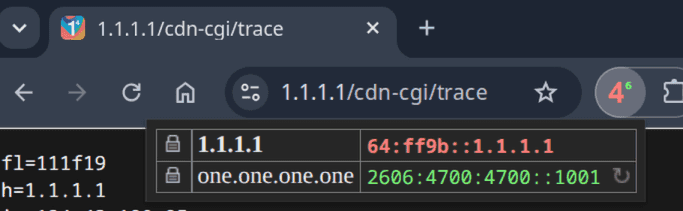
64:ff9b::1.1.1.1 is not something I typed. The last 32 bits are simply 1.1.1.1 written in hex, and 64:ff9b::/96 is the NAT64 well-known prefix from RFC 6052. I already knew my ISP’s IPv6 setup ran NAT64 using that well-known prefix, so the moment I saw 64:ff9b:: sitting in the panel it was instantly recognisable. Chrome had taken the IPv4 address I typed and embedded it into my ISP’s translation prefix before connecting.
The short version#
If you’re on an IPv6-only network, one that hands you IPv6 plus a NAT64 gateway but no native IPv4 at all, Chrome translates IPv4 addresses you type itself, converting them to IPv6 using the network’s NAT64 prefix so the connection can go through.
This matters because typed IPv4 addresses are a blind spot for almost every other translation mechanism. DNS64 only works on hostnames: it watches for a AAAA query that comes back empty, then synthesises an answer from the A record. When you type 1.1.1.1 or 192.168.1.1 there is no DNS query at all, so DNS64 has nothing to intercept. On a network with no native IPv4 and no 464XLAT to fall back on, that used to simply mean the page wouldn’t load.
Chrome closes that gap inside the browser rather than relying on the OS or the network to do it for it. This is a genuine Chrome feature, not something your phone or router is doing. On a normal dual-stack network none of it triggers, and everything behaves exactly as before.
How Chrome finds the prefix#
Before it can translate anything, Chrome has to work out which NAT64 prefix the network actually uses. It cannot just assume 64:ff9b::/96, because plenty of operators run their own prefix instead. Mine happened to be the well-known one, but that is not guaranteed.
So Chrome looks up a special name, ipv4only.arpa, which exists for exactly this purpose and is defined in RFC 7050. That name is guaranteed to resolve to two specific IPv4 addresses, and a DNS64 server will synthesise IPv6 answers for it. Those synthesised answers carry the network’s NAT64 prefix, so Chrome reads the prefix straight out of the response and uses it. RFC 6052 allows several possible prefix lengths, and Chrome handles all of them rather than only the common 96-bit one.
If that lookup fails, either because there is no DNS64 on the network or because something odd comes back, Chrome does not error out. It leaves the IPv4 address alone and connects the way it always would. On a network with no NAT64 whatsoever, you would never notice any of this was happening.
A gotcha if you administer network kit#
The translation is not limited to public addresses. Chrome will rewrite private ones too, so on an IPv6-only network http://192.168.1.1/ for a router admin page can get turned into a NAT64 address. Whether that breaks anything depends entirely on whether your NAT64 gateway routes private space back to you, and usually it will not, which means the web UI can become unreachable. If you suddenly cannot reach a device’s admin page on a v6-only network, this is worth ruling out.
Seeing it for yourself#
- Be on an IPv6-only network with NAT64/DNS64 and no CLAT.
- Open DevTools → Network.
- Type an IPv4 address with a path into the omnibox, e.g.
1.1.1.1/cdn-cgi/trace. - Click the request and look at Remote Address.
Instead of 1.1.1.1:80 you will see something like 64:ff9b::1.1.1.1:80. 1.1.1.1/cdn-cgi/trace is a handy target for this because Cloudflare echoes your client IP straight back, so you can compare what you typed against what the server saw.
Where this came from#
I posted the screenshot, and a few months later Beni HB9HNT dug up the actual commit that implements it. It was something I had tried and failed to find at the time.
It is commit f1accfce64dea, titled “IPv4 to IPv6 address synthesis described in RFC6052”, written by Momoka Yamamoto and landed on 13 October 2022. The Chrome 108 branch was cut the very next day, so this shipped in Chrome 108 in December 2022. It has been sitting in the resolver for years, and I only stumbled onto it recently. There is a matching Chromium CL 3691238 and Issue 915087 if you want the full detail.
It shipped with a chrome://flags kill switch. That toggle and the underlying flag have since been removed, so the behaviour is now unconditional. There is nothing to enable or disable.
References#
- My original post: https://ipv6.social/@miyuru/116696621805513645
- Beni HB9HNT finding the commit: https://wirebug.ch/beni/p/1792178219.712416
- The commit: https://chromium.googlesource.com/chromium/src.git/+/f1accfce64dea1640ff5fb04b3134cda44fee7eb%5E%21/
- Chromium CL 3691238 and Issue 915087
- RFC 6052: IPv6 Addressing of IPv4/IPv6 Translators
- RFC 7050: Discovery of the IPv6 Prefix Used for IPv6 Address Synthesis
- RFC 8215: the
64:ff9b::/96well-known prefix - RFC 6877: 464XLAT, for the CLAT side of the story